
There are excellent voice dictation tools for Windows and Mac: Wispr Flow, VoiceOS and dozens of others, each one glossier than the last. You hold a key, you speak, and the text appears wherever you are working, as though an invisible typist were sitting behind you, one who never tires, never complains and never asks for a day off. In English they are impressive. In Greek, in our own tests, they are not.
And when I say not, I do not mean “a bit worse”. I mean we often could not use them.
I know how that sounds for an opening line. Park it until the end and then tell me whether I overstated it.
This is the story of a tool we built because we could not find a ready-made one that covered us.
Let us be clear: the problem was not accuracy
You would expect the issue to be a few wrong words. A missed ending, a name spelled oddly, the usual things you fix on the fly without even thinking about it. I wish. It was not that.
The wrong language entirely. Time and again a purely Greek sentence was recognized as Spanish, Chinese or Russian. The result was not a wrong word, it was gibberish: a pile of characters that said absolutely nothing. There was nothing to correct; there was garbage to delete before starting over. A tool that fails like that is not inaccurate, it is useless. And the worst part? You only find out after you have already spoken. You have delivered the whole thought, with emphasis, with pauses in the right places, and then you stare at a screen that answered you in a language you never studied.
Language mixing. A Greek professional’s speech is mostly Greek, with scattered English words in between: server, backup, deploy, commit. That is simply how we talk; nobody is showing off. Ask anyone who has sat next to a developer explaining what went wrong. The commercial tools we tried would often either “correct” the English words into wrong Greek ones, or flip the whole sentence into English, with the confidence of someone who knows better than you what you meant to say.
Wrong punctuation. The Greek question mark ”;” was often not placed correctly. Sentences came out as endless runs of words with plain periods, the kind of text where you run out of breath before you reach the meaning. So you sit down and re-punctuate the thing that was supposed to save you from typing.
Little customization. Tool names, technical terms, client names: usually wrong, and no easy way to teach them to the program. The same mistake, every day, with admirable consistency. If I admired anything there, it was the stamina.
Locked to one engine. The tools we tried worked with a single recognition engine. If it does not suit you, there is no alternative. Take it or leave it.
The goal was simple to state and hard to build: a tool that genuinely understands Greek, along with the Greek-plus-English mix, and gets the punctuation right. Easy to say. Let us look at how it went.
How it works
VoiceType lives in the Windows system tray. You hold a key, speak, release it, and the text types itself into whatever app you are working in: Word, a browser, a code editor, chat, anywhere.
First the speech becomes text. Then the text is cleaned up by an AI model on an external service: punctuation, question marks, capitals. It is not translated, the English words stay exactly as you said them. The meaning does not change. And your personal vocabulary comes out right, even when it sounded distorted.
You can choose between four recognition engines, one of which runs on your own machine, offline and with no per-word cost, while the other three send the audio to an external service. And you can bind two independent keys, each with its own engine.
Because “correct punctuation” means different things for different work, and nobody dictates a contract the way they dictate a chat message, there is an intensity scale of 1 to 5: from very conservative, only certain periods, to very aggressive, catching every question and every emphasis.
That point deserves attention, because it explains something many people misread. As far as we can judge from outside, Wispr Flow does not catch question marks because it “hears” better. It catches them because it adds them in post-processing, after recognition. VoiceType does the same, with the difference that the dial is in your hands. No magic, then. Somebody decides where the question mark goes, and we preferred that somebody to be you.
And then, as always, it grew
The tool quickly became more than that. That is how it always goes: you build the thing you were missing, you get a taste for it, and you keep going. It gained a control panel with words per minute, time saved, corrections, a consistency calendar, top apps and a cost estimate per engine. Yes, a dictation tool grew statistics. It is software, after all; it was always going to end up there.
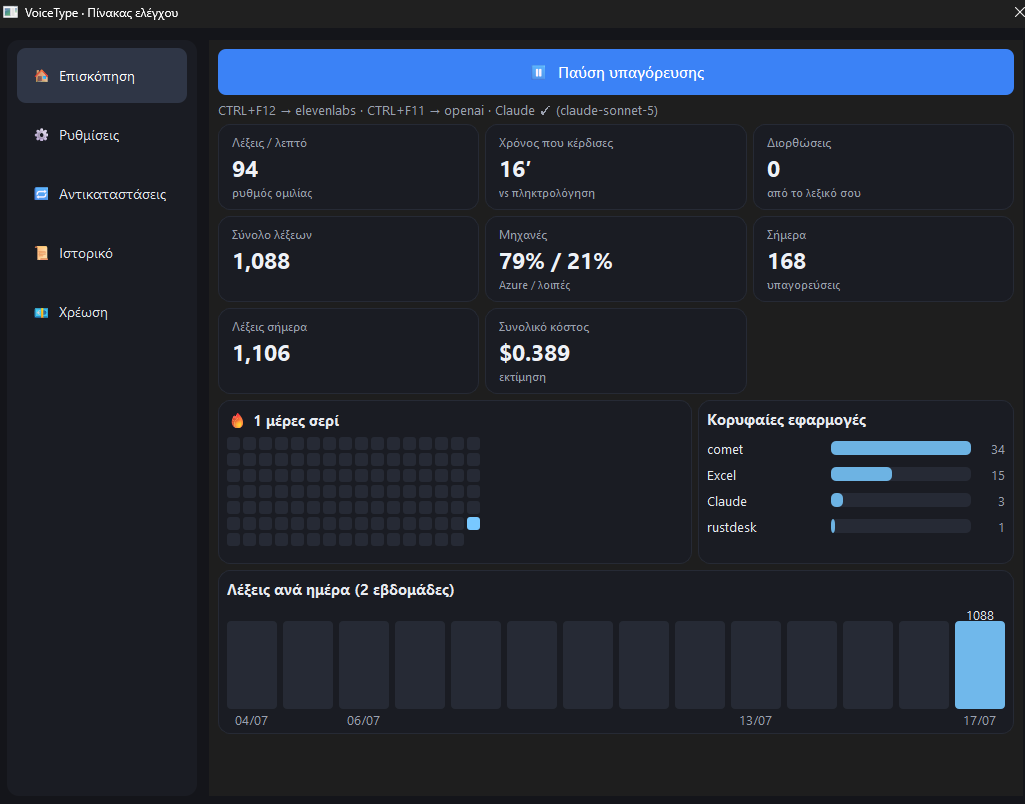
In our own use the speech rate measures around 94 words per minute. You do not need to know your typing speed to see the difference: few people type that fast. And from there came the small things, which turn out to be the big ones. A visual waveform above the cursor while you speak, discreet, without stealing focus. Water-drop sounds on start and stop, synthesized internally. Voice commands that turn into formatting. A personal replacements dictionary. Three injection modes: paste, character-by-character typing, or copy to clipboard only. None of those details sells the tool on its own. Together, though, they are the whole distance between “I tried it once” and “I use it every day”.
The hard part
The easy part was sending audio to an API (a connection that lets two programs talk). The hard part was behaving like a real Windows program: invisible, fast, unobtrusive. That is where the real problems hid, and that is where most of the time went. As usual: the idea comes together quickly, the behaviour takes weeks.
In the first version the cursor jumped out of the app you were typing in, the settings were lost on every launch, and the last word was cut off the moment you released the key. And since the last word is usually the one carrying the point, this was maddening. Some of these problems were silent, which is the worst kind of failure: no message, no error, the thing you asked for simply does not happen.
Today the cursor stays where you left it, the settings are remembered, and the last word gets written in full. Details like these are what separate a prototype from a tool you trust every day.
What came out of all this
An internal tool that, for our own Greek with scattered English, gives us better results than the commercial products we tried. Not because we are better engineers than they are, let us not get carried away, but because it solves our problem, which they had no reason to solve.
Language locking, so it does not “correct” Greek into English or the reverse. Editing with an intensity dial. Personal vocabulary. Four engines, so you pick the balance of speed, cost and accuracy without depending on a single provider. And a choice about where the data goes: with the local engine the audio stays on the machine, while the other engines and the editing stage send audio or text to external services.
The lesson, though, is more general, and it is the same one that comes out of MS-Tools: good general-purpose tools often fail at the edges. And the edges, a second language, a specialized vocabulary, a particular punctuation, are often exactly where your work lives. In the middle everything looks perfect. At the edges your day is won or lost.
Remember that opening line I asked you to park? Let us pick it back up. We started with a program that heard Greek and wrote Chinese. We ended up with one that hears Greek and writes Greek, question mark in the right place. When the off-the-shelf tool does not do the job, we build one.
If there is a task in your work that no ready-made tool does properly, that is what we discuss: exactly what the tool has to do, what data it needs and which solution fits. We agree from the start what stays on your computer and what is sent to an external service. Tell me through the contact form which task eats your time and what you use for it today. This work is part of our AI solutions.
The whole picture: this article covers one part of a larger subject. If you are after the whole of it, from beginning to end, it is in the guide to AI in your business.
