
by MS-Logic
MS-Finance
Snap the receipt. The transaction is in.
The web app for your personal and business finances - for individuals, households and freelancers. Photograph the receipt, tell it your expenses by voice, ask in plain language - and the smart assistant works on your own data, never without your approval.
3 months free, then you decide · Demo: demo@mslogic.eu / Demo!2026
€24 per year excl. VAT · Data hosted in the EU · A legal invoice with every purchase
Effortless entry
The boring part - entering transactions - practically does itself.
Receipt photo, transaction done
Snap the receipt with your phone. The assistant reads the amount, date and store, suggests a category, and one tap records the transaction. It works with Greek thermal receipts too - and the photo is never stored anywhere.
Tell it your expenses, by voice
Speak to the assistant: "log 20 euros of fuel on the card". It prepares the transactions and waits for your confirmation. Available on compatible browsers, ideally Chrome on Android.
Rules that work for you
"Always OK Market, category Groceries": the moment it sees you do it, the app suggests the rule - or you define it yourself. It applies to new transactions, to imports, even retroactively to old uncategorized ones.
Two moves from your pocket
On Android and desktop, long-press the icon and "New expense". On iPhone, set the app to open straight into a new transaction.
Nothing is written without you - every assistant suggestion goes through a confirmation card.
A clear picture, not just a list
Find the subscriptions you forgot you pay
The app detects recurring charges on its own - Netflix, utilities, the gym - from your history, and suggests turning them into obligations with one click.
Your net worth, month by month
A chart of your total net worth over time, a breakdown by account type, and manual updates for the value of your investments.
A debt payoff plan
Enter cards and loans, interest rates and your monthly budget. It compares the snowball and avalanche strategies with payoff dates, total interest and a chart - and you see how much the right order saves you.
Cash flow, budget and goals
Cash flow forecasting, smart budget suggestions from your real average spending, savings goals and reports. Plus a discreet check on unusual transactions before saving.
What it looks like
Real MS-Finance screens, from the demo account. The interface is available in Greek and English; these are the Greek screens.
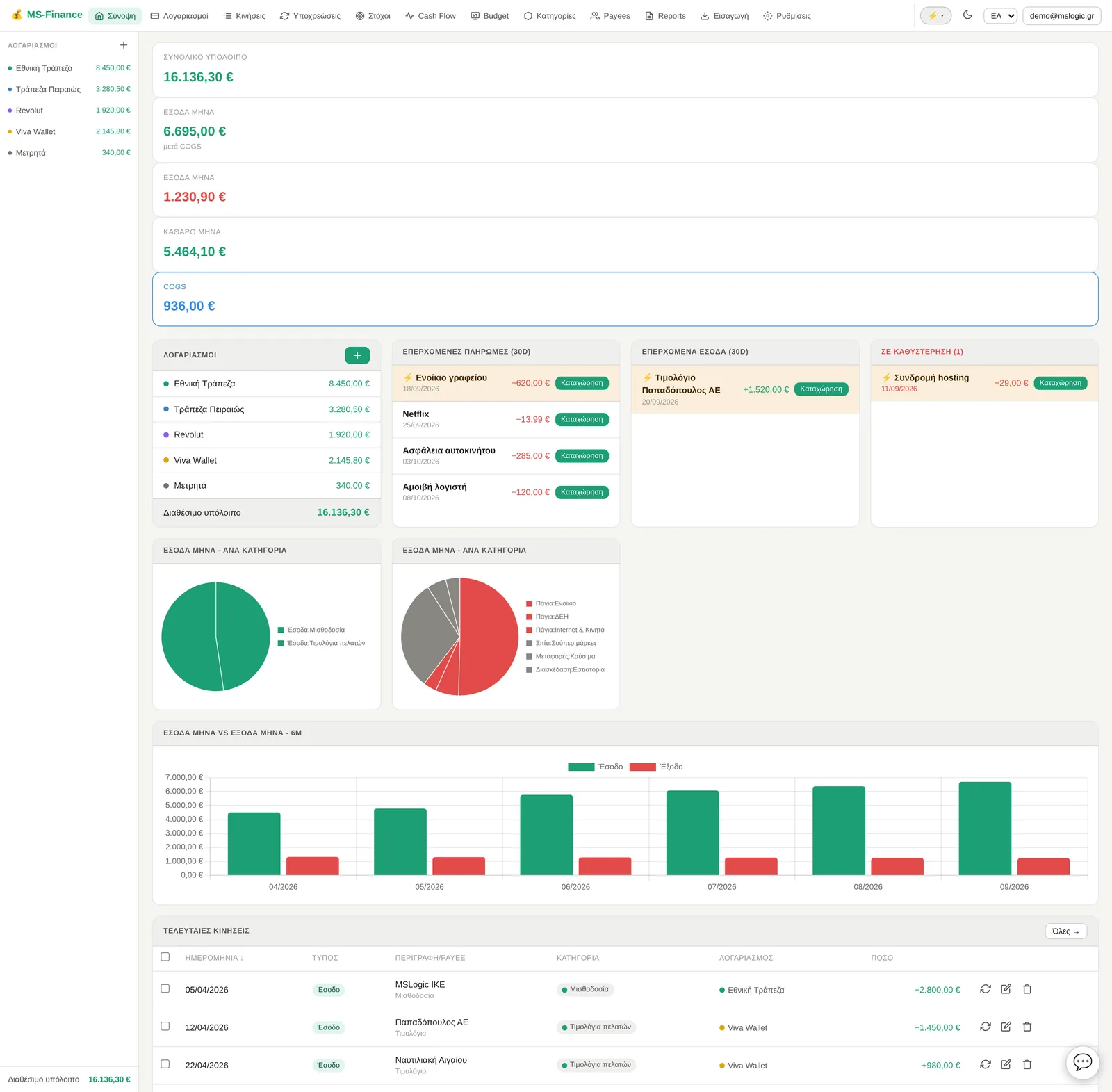
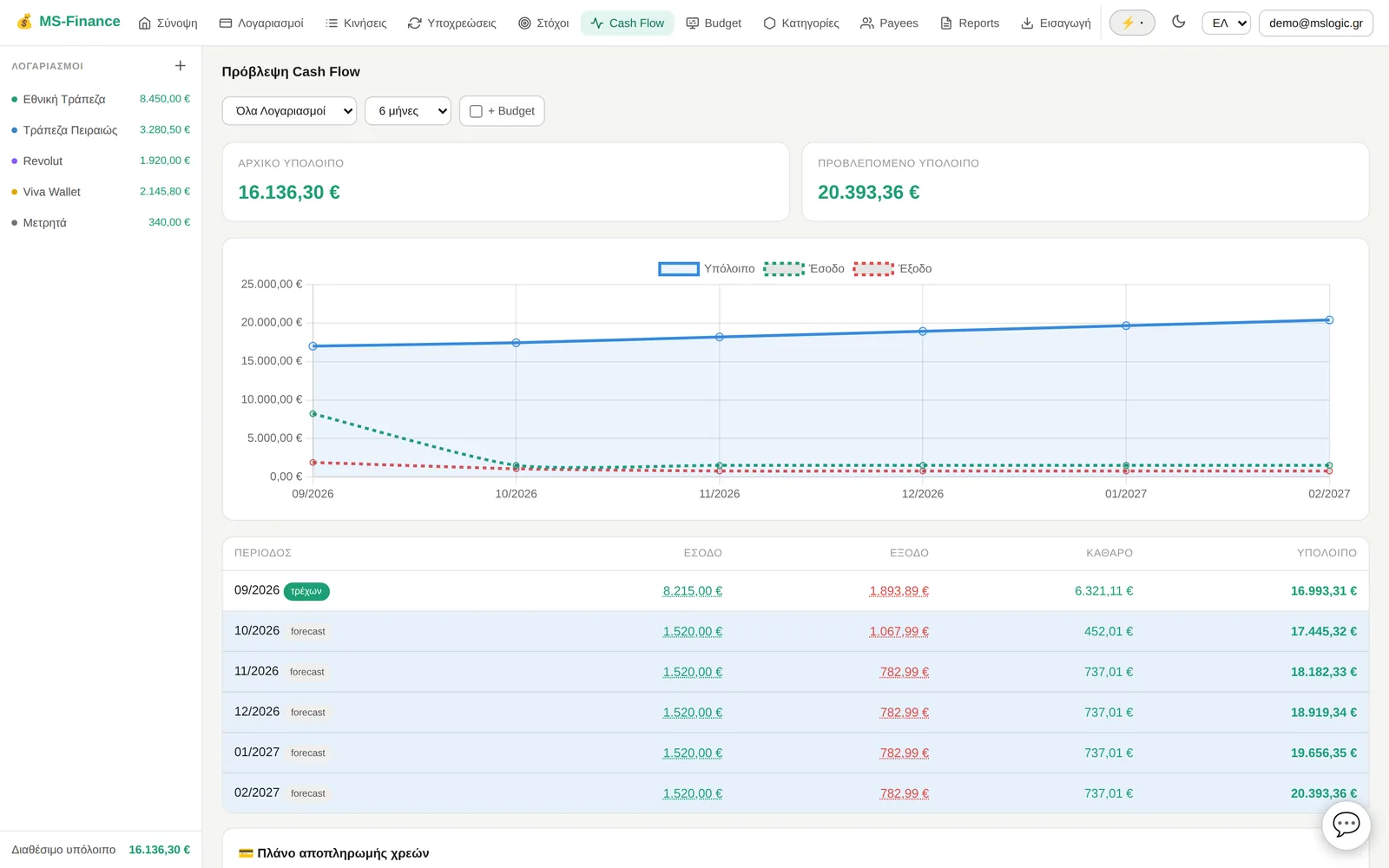
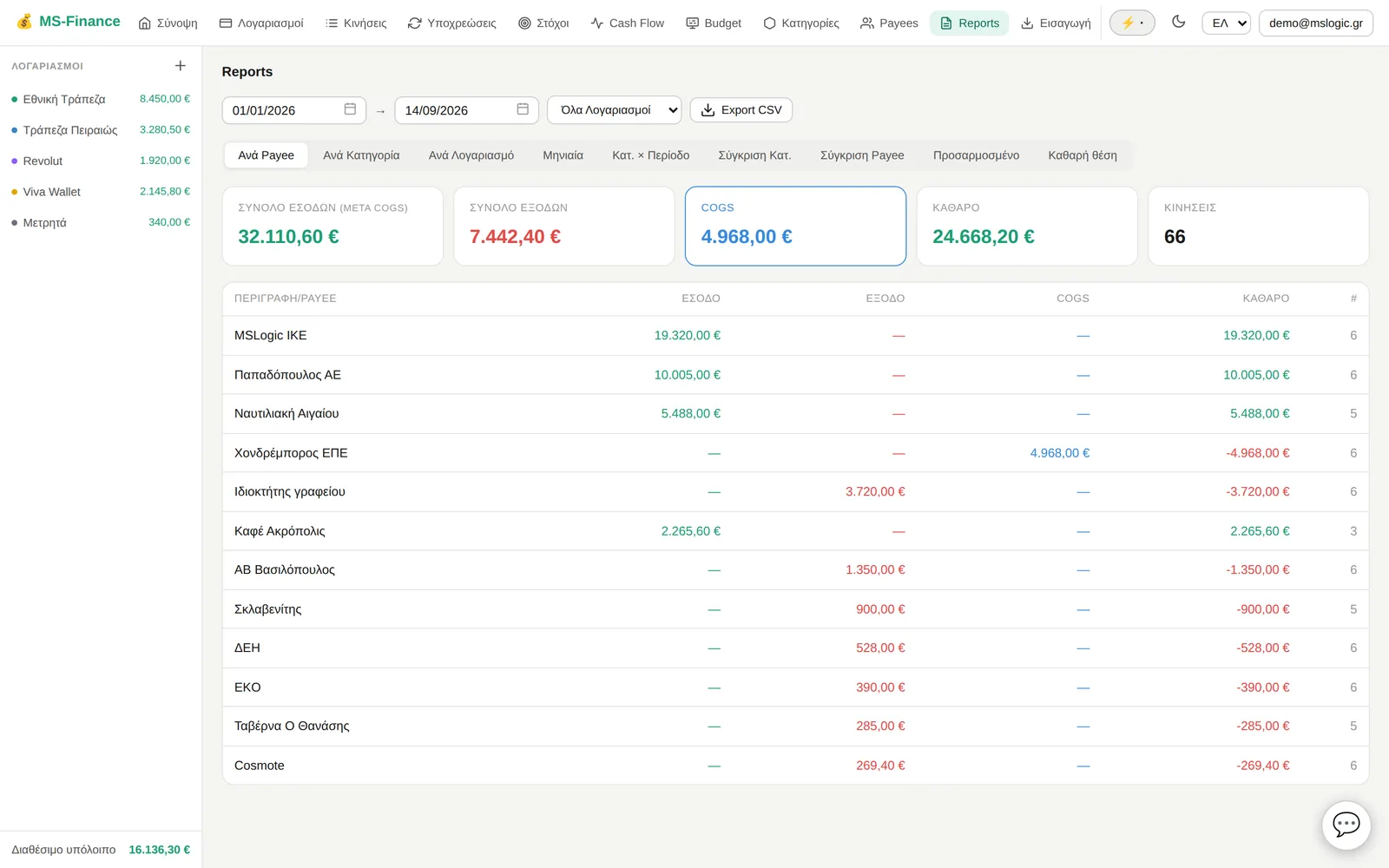
An assistant on your own data
Not generic advice - answers with your own numbers.
Ask in plain language
"How much did I spend on groceries in May?", "how is this month’s budget going?" - it answers with real numbers and comparisons from your own data, not with generalities.
Records only with your approval
However you tell it - by text, by voice or with a photo - nothing is written without the confirmation card.
Learns your habits
It suggests your own category per store, based on how you record things - not from canned lists.
Units, no separate subscription
The assistant runs on units: 1 for a simple question, 10 for a deep analysis. The subscription includes no monthly units - you buy packs only when you need them, they never expire, and they work across the whole MS-Logic ecosystem.
Assistant units, shared across the ecosystem
The assistant runs on units, and your balance is one balance for all of MS-Logic. Whatever units you have, you spend them where you want: today in MS-Finance, tomorrow in Ekkremés, the day after in LogicInvoice. One account, one balance.
In MS-Finance, purchased only
The MS-Finance subscription includes no monthly units. You buy a pack whenever you need one, with no separate subscription for the assistant.
They never expire
The units you buy stay in your balance until you use them, in whichever app of the ecosystem you like.
If you also subscribe to another app that grants monthly units, those are valid within the month and do not carry over. Your balance is always visible.
Import without headaches
A profile per bank
Map your bank statement’s columns once and save it as a profile. Every future import is one click. Full support for Greek bank CSVs, tested with real statements.
No duplicates, ever
If you download and import the same file again, no transaction is recorded twice.
And from Quicken
Import from QIF and CSV, so your whole history comes with you.
Security that stays out of your way
A lock like your bank’s
Optional per-device lock with a PIN or Face ID / fingerprint. The PIN never leaves your device.
Data hosted in the EU
Hosted on our own EU infrastructure - your data does not pass through third-party CDNs or services during use.
Your receipts stay yours
Receipt photos are read, turned into a transaction, and never stored anywhere.
A legal invoice, automatically
Every purchase automatically issues a legal invoice (Greek myDATA) that arrives by email.
Simple pricing
One annual subscription with everything included, no monthly plan. An assistant on units you buy once and that never expire.
- Every feature, no tiers
- 3 months of free use before you subscribe
- Greek and English, PWA everywhere
1 unit for a simple question, 10 for a deep analysis. They never expire, they accumulate, no separate subscription - and they work across the whole ecosystem.
- 100 units€2.99
- 250 units€6.99
- 500 units€12.99
- 1000 units€24.99
Final prices, VAT included.
Every purchase automatically issues a legal invoice (Greek myDATA) delivered by email.
Frequently asked questions
Does it connect to my bank automatically?
No, there is no Open Banking connection. You bring transactions in via file import (CSV or QIF): set up your bank’s profile once, and every import after that is one click, with no duplicates.
Where is my data stored?
On our own infrastructure within the EU - it does not pass through third-party CDNs or services during use.
Are receipt photos stored?
No. The assistant reads them, prepares the transaction, and the photo is never stored anywhere.
What are units and when do they expire?
How assistant usage is measured: 1 unit for a simple question, 10 for a deep analysis. In MS-Finance units are only purchased, never granted monthly - and purchased units never expire.
Do units work in the other apps too?
Yes. Your unit balance is shared across the whole MS-Logic ecosystem: spend it in MS-Finance, Ekkremés or LogicInvoice, from the same balance.
Does it work on mobile?
Yes - it installs as an app (PWA) on mobile and desktop.
Can I see it before signing up?
Yes, with the demo account: demo@mslogic.eu / Demo!2026. And after that, 3 months of free use to see whether it suits you, before you subscribe.
Does voice entry work everywhere?
On compatible browsers - ideally Chrome on Android. Where it is not supported, you always have text and the receipt photo.
Who is MS-Finance for?
Individuals, households and freelancers. It is not aimed at companies with complex accounting.
Your finances, minus the boring work
Three months free, no commitment. Or take a look first with the demo account: demo@mslogic.eu / Demo!2026
Try it free